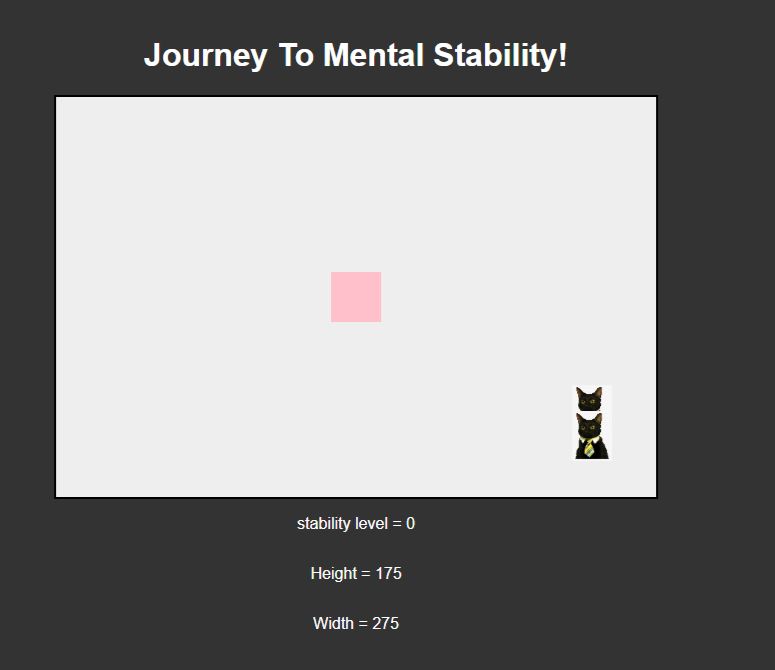
I made a game where you dodge cats and as they get to the other side you get an increase in score and it gets harder(ish). I made the game using html and javascript as long as some css for looks. The Javascript and css is inline within the html. (There are two other thrown-together pages, a start page and an end page but they aren’t that important and are quite simple)
This is what it looks like:
How it Works: HTML
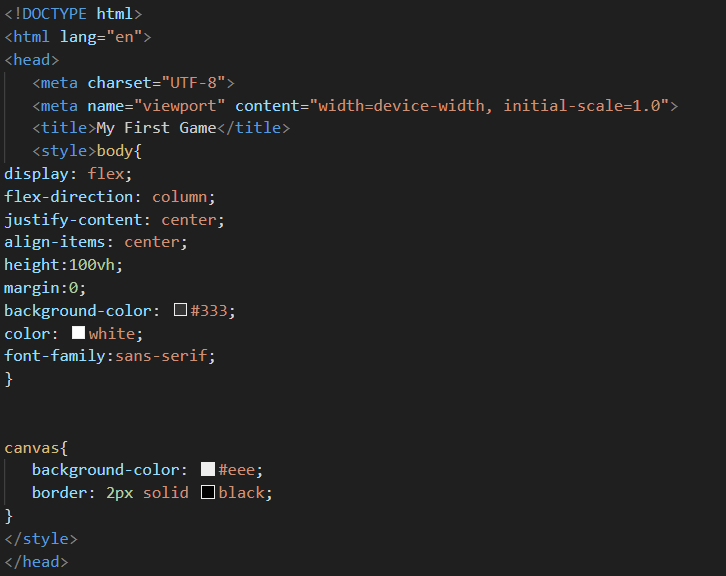
This is The head section. Its where all of the css and a few other things are:
The title changes the page title while the style tags are Css for the canvas and body of the page.
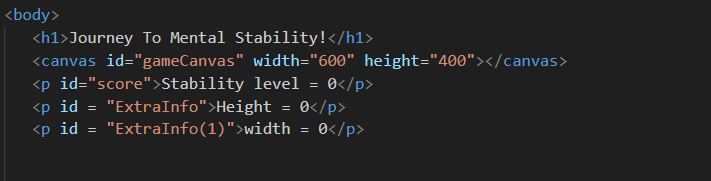
This is the body section, or at least most of it because part of it is the Javascript code:
The H1 tags are the title, the canvas tags make an area where the game takes place and the id subtags allow the parts to be changed by the Javascript.
How It Works (2): Some of the Javascript
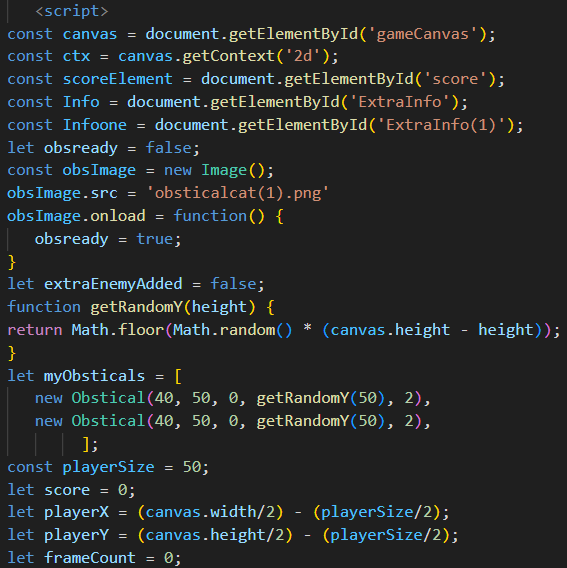
This is the top of the Javascript:
It is where the varibles are defined
Notice how there are a lot of variables and how there are both const and let variables. The const variables are mostly parts from the html while the let variables are mostly different parts for the game, such as the player size and position.
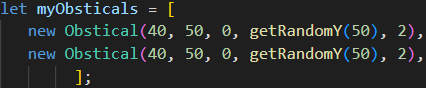
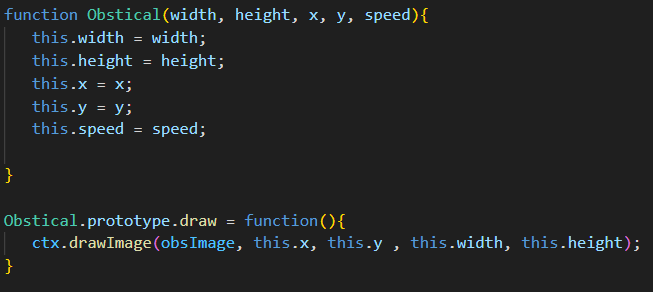
This is part that makes it so each enemy is different in the way you want it:
The top part is a function that defines what goes where so everything makes sense for the array on the right of the slide.
The second part creates a prototype so that alle enemies share the same drawImage
This one:
How It Works (3): More Javascript!
This is the gameLoop function:
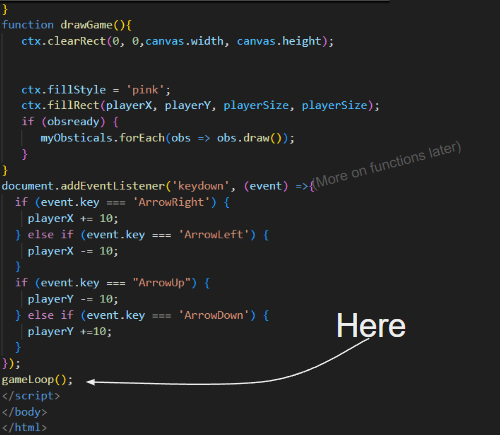
It’s kinda the most important part of the code because this is where it loops all the other code for the game. updateGame and and drawGame are both functions later in the code. It (The GameLoop) is actually called back at the end of the code:
How It Works (4): A crash course on functions from someone who barely knows what he’s doing (he still knows what he’s doing though… Maybe?)
Functions are basically variables for code you put the code in and then can use it later. This is helpful if you need to use the same code more than one or more likely; to make everything orderly and looking nice. There are probably a ton of other things regarding functions I am oblivious to and I am probably explaining everything wrong but this is my explanation. Once again: I barely know what I’m doing.
How It Works (5): More Javascript (Probably the update game function)
By now you should already know this but… The rest of these slides are gonna be JavaScript.
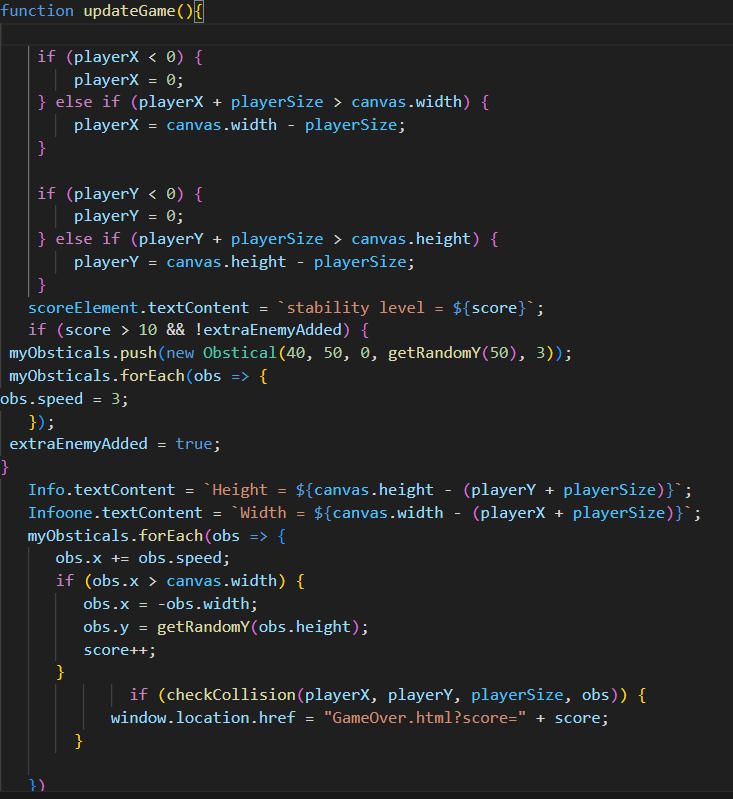
This is the updateGame function:
The top consists of a bunch of (if) statements. (They are pretty much just collision detection for the player and the walls that is pretty basic so I won’t dive to deep into it)
How It works (6): The UpdateGame function (cont)
The scoreElement.textContent and the other .textContent parts are what change the text at the bottom to show the score and such live. If you go back to the variables you will notice the parts before .textContent are there. The part below the score element is what checks if an extra enemy is added and if the score is high enough before using push to add another obstacle to the array while also increasing the speed of all the enemies. Then the extraEnemyAdded = true makes it so the code knows no to add another enemy although now I know there is a way to check the array length which is more accurate. There are then more text content lines that I went over before.
How It Works (7): the update game function (cont) (cont)
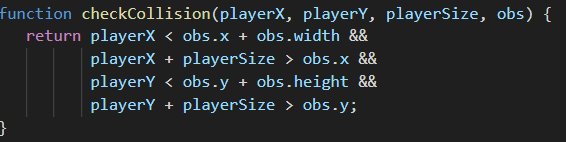
The part below the two text content parts is the part that moves the enemies across the canvas checks if they are off the canvas and then in creases the score and moves the enemies back to the left side. The if (checkCollision) uses the check collision function and then takes you to the game over page when you lose.
Here is the checkCollision function: Collision detection is quite easy when everything is a rectangle :)
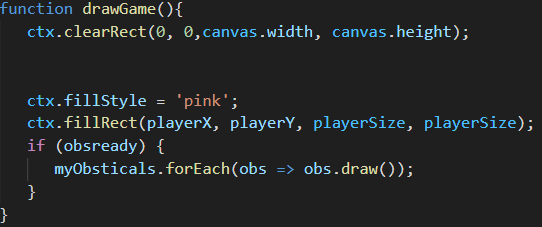
How It Works (8): The drawGame Function
This is the draw game function: It handles all of the “Drawing” of the game: for example the creation of the obstacles, the player, and wiping the canvas. The ctx.clear rect clears the screen so I dosn’t get filled with stuff, the fillstyle and fillRect lines create the character and the final is statement creates the enemies the if just checks wether the image has loaded.
How It Works (9): Event Lister-End
This is the Event lister: Its what checks if any of the keys are pressed. Pretty much just if statements to check is the keys are down. There is also where the gameloop is called back which makes the game like, work. The link for the game is the link at the bottom and that is all.